Everything you own, in one app.
Accounts, cards, investments and cash in a single number: your net worth. Link your bank with read-only access and your balances, transactions and spending update on their own.
Free to start. Premium with up to 14 days’ free trial.
- Read-only: it never moves money
- Data on servers in the European Union
- No ads, data never sold
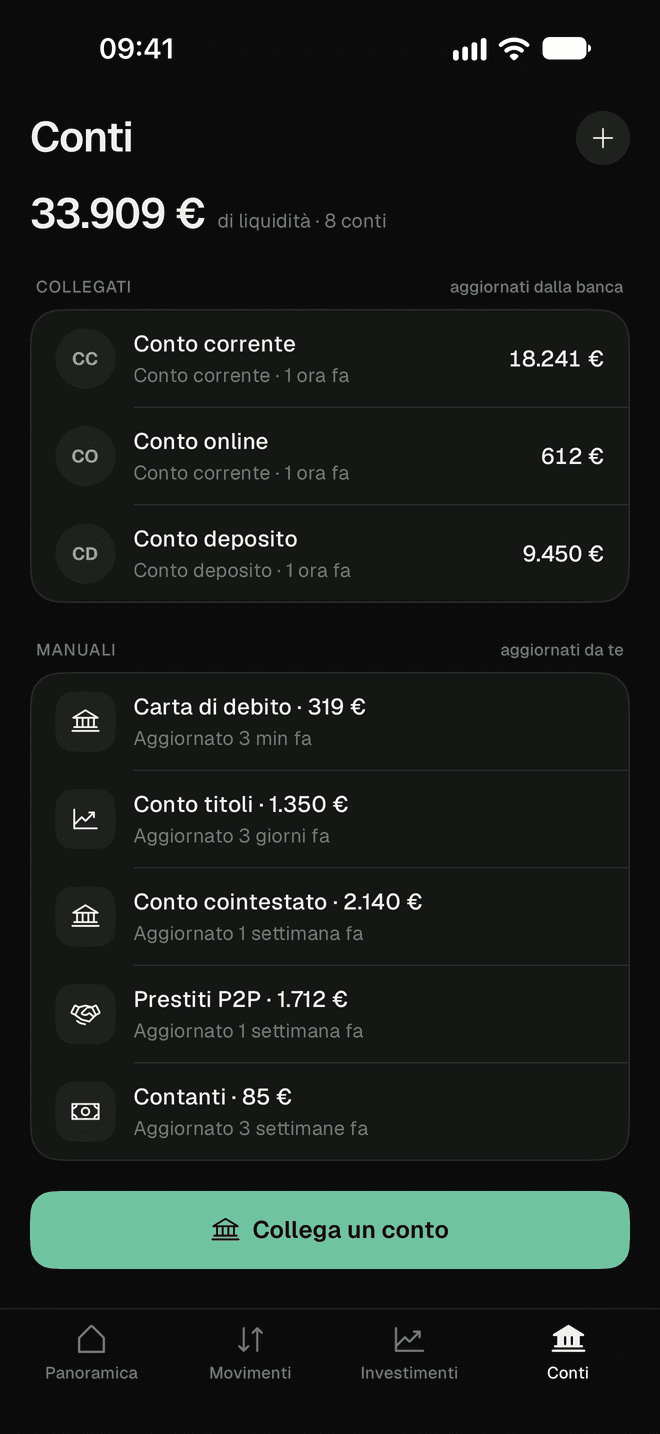
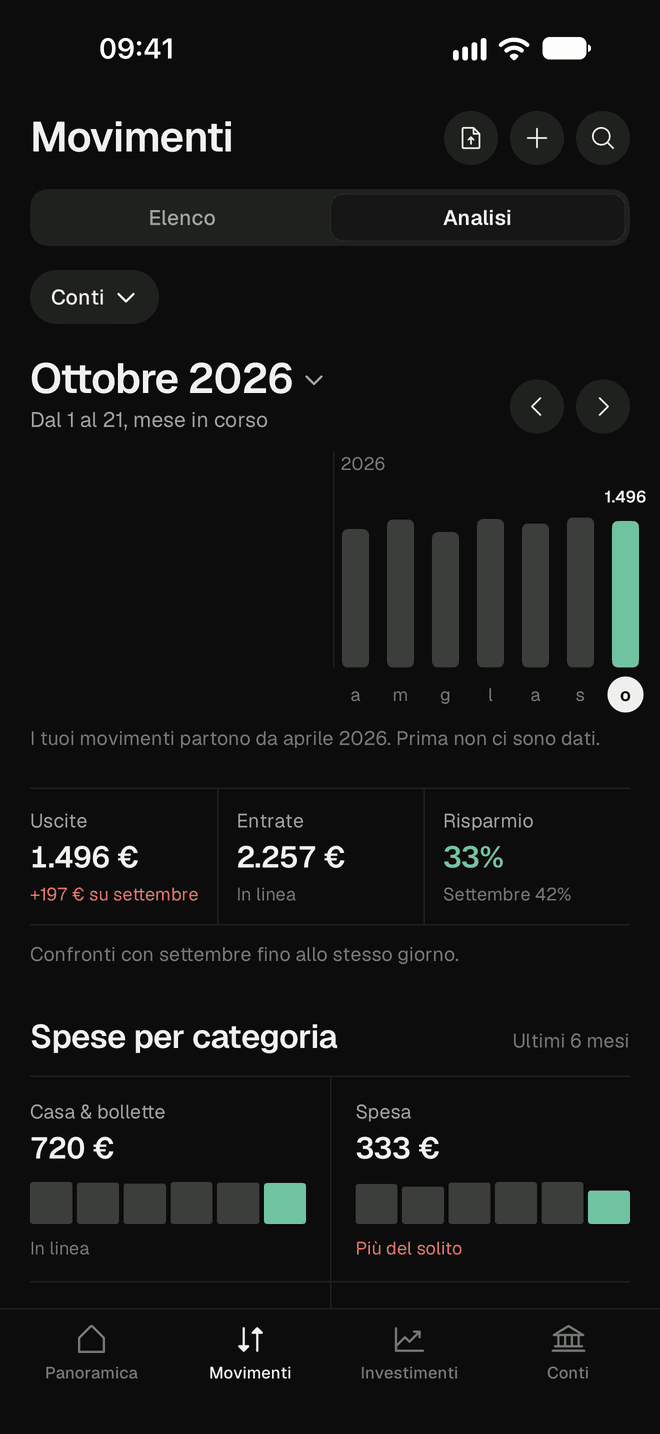
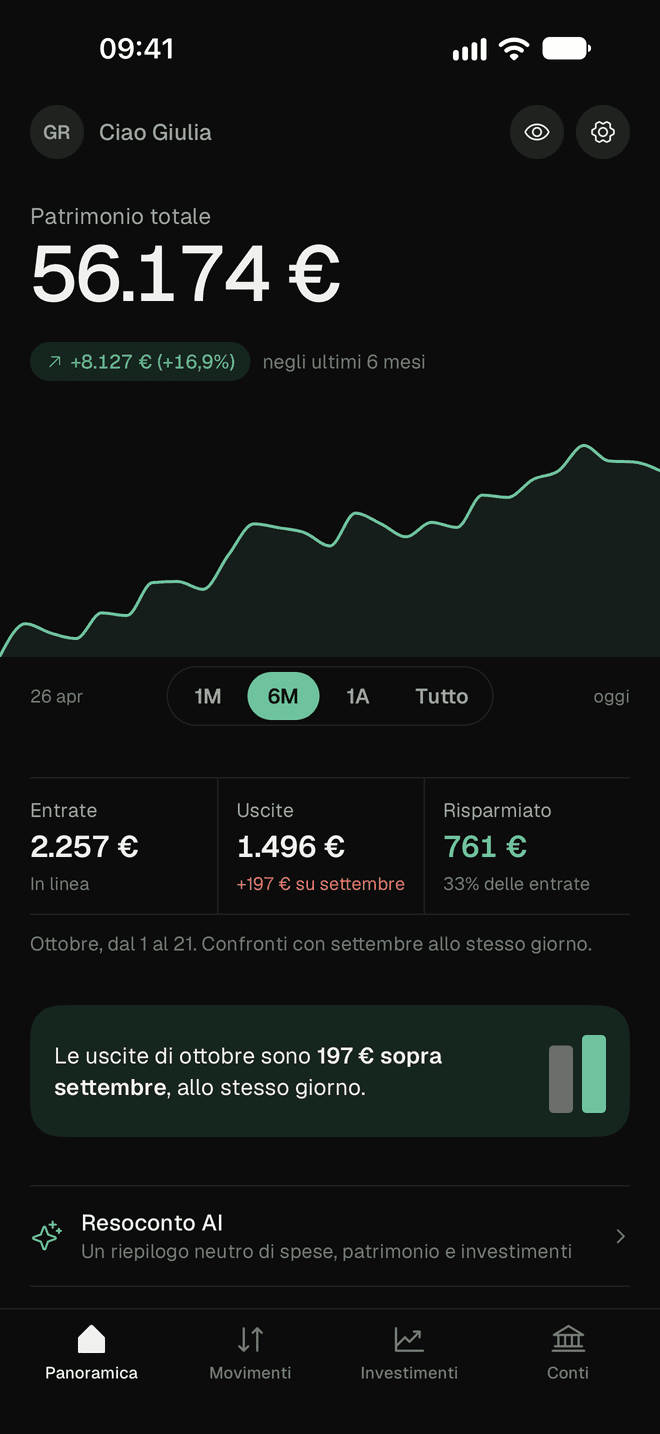
Accounts, investments and spending, finally in one place
Your net worth, day by day
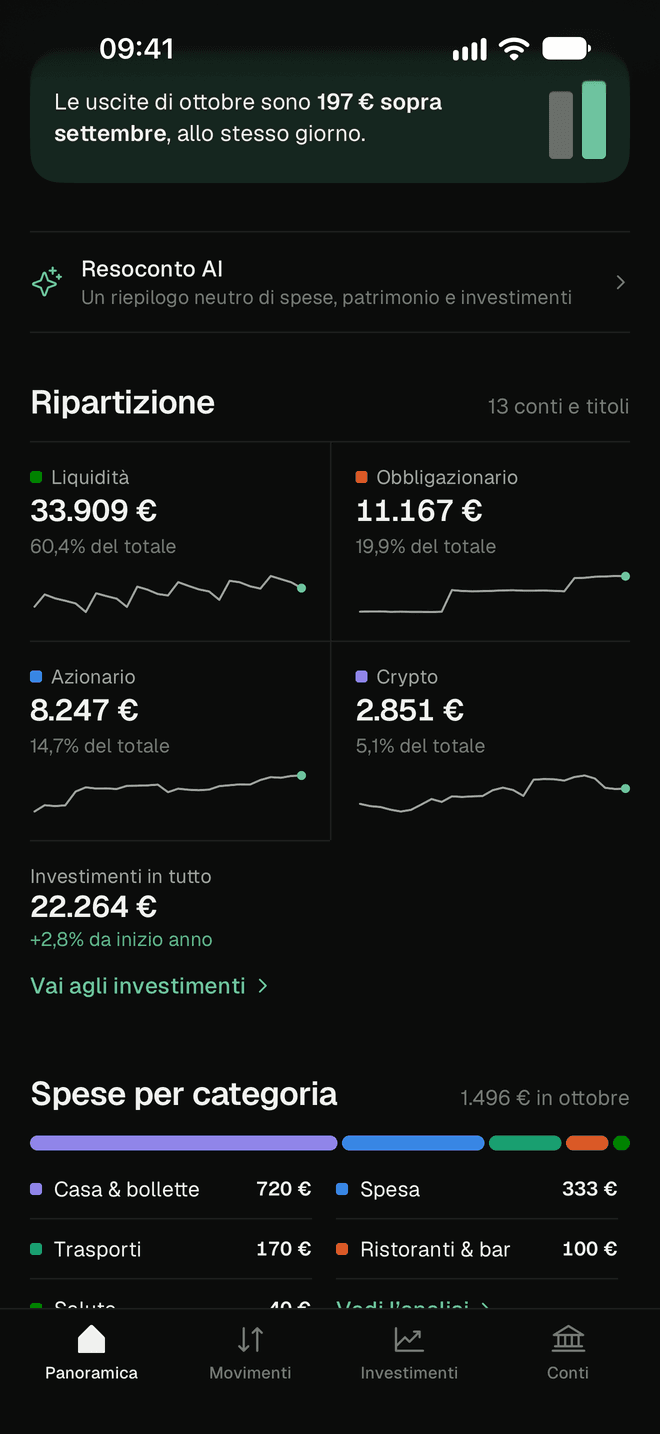
Cash and investments added up in a single number, with a chart of how it has changed over time and the split between accounts, bonds, shares and crypto. Every month you see how much came in, how much went out and how much you put aside.
With Premium
Link your bank, read-only
Balances and transactions of linked accounts update on their own several times a day. Soldoni can read them, but cannot move money or make payments. Savings accounts, brokers, P2P loans and cash you update by hand in a few seconds.
With Premium
Your spending records itself
Pay with Apple Pay and the transaction appears in Soldoni, with amount, shop and date. You set it up once with the iPhone’s Shortcuts app, and it also works with cards from banks that don’t link.
See where your money goes
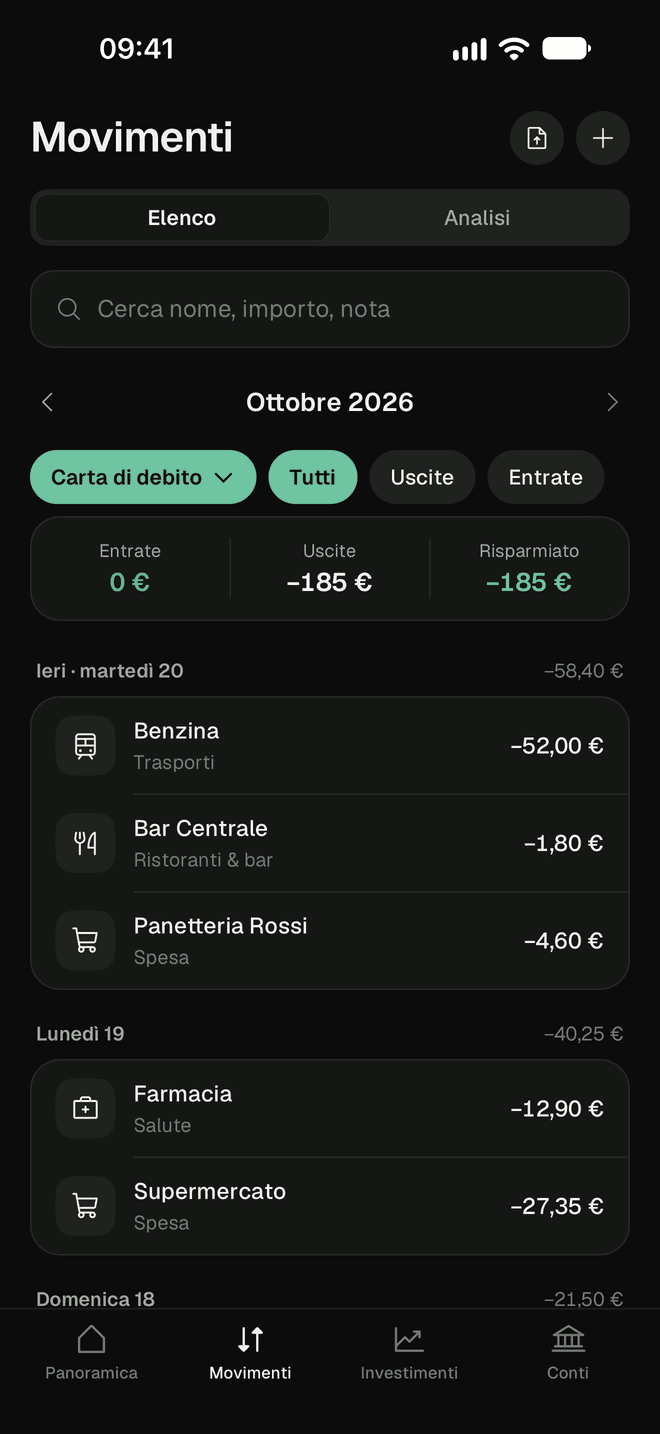
Income, spending and savings for every month, compared with the month before. Spending by category and by shop, and the payments that come back every month, like subscriptions and bills. Even for a single account.
Every expense in its category
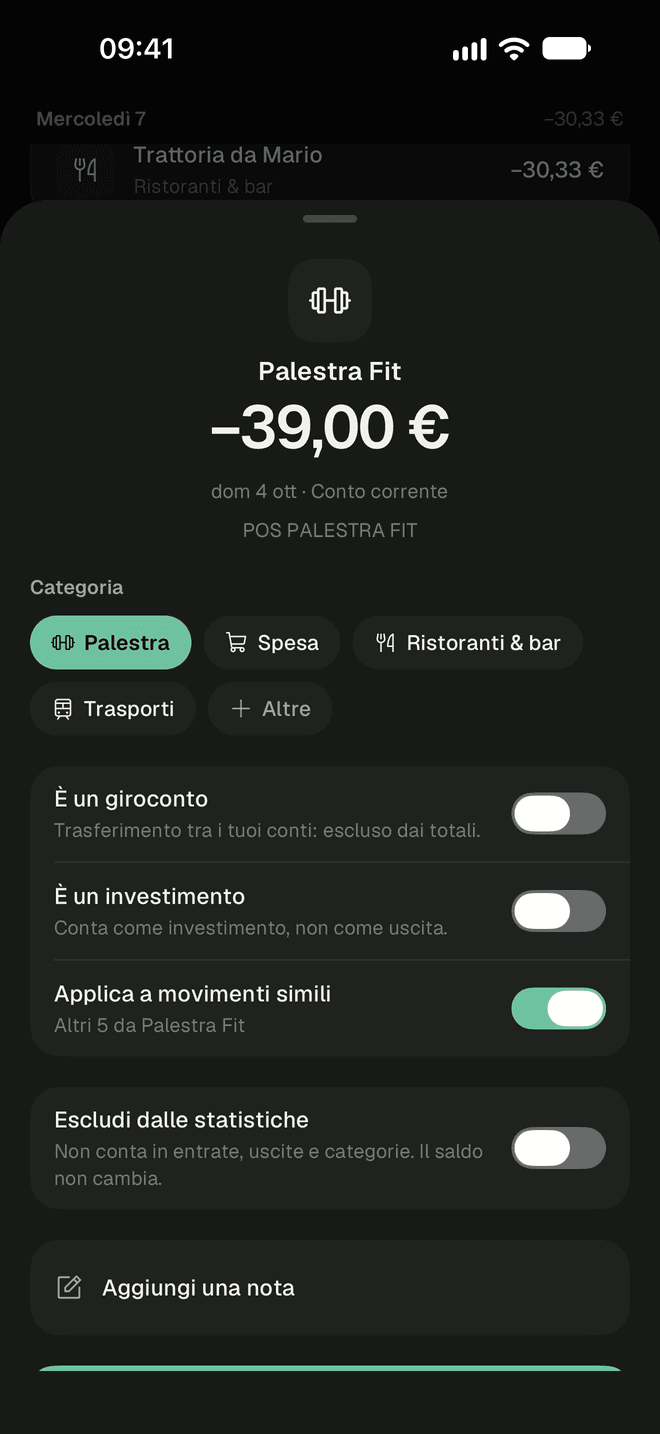
Groceries, home, restaurants, transport, subscriptions: every transaction lands in its category automatically, including the ones you create. Change it with one tap, for all similar transactions too. Transfers between your own accounts don’t count as spending.
ETFs, shares, government bonds and crypto, together
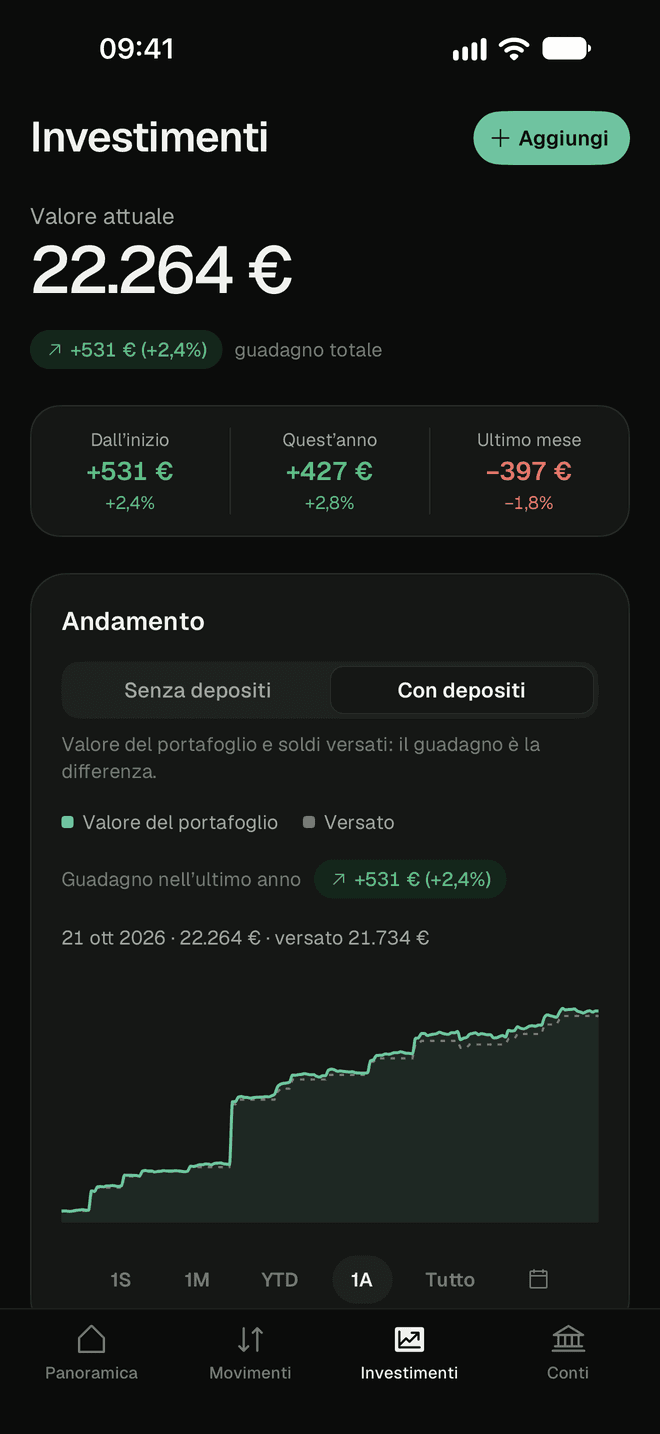
Enter your orders or import them from your broker’s file. Soldoni works out value, gain or loss and allocation with each day’s prices, and your return with or without your deposits.
With Premium
Import your bank statement
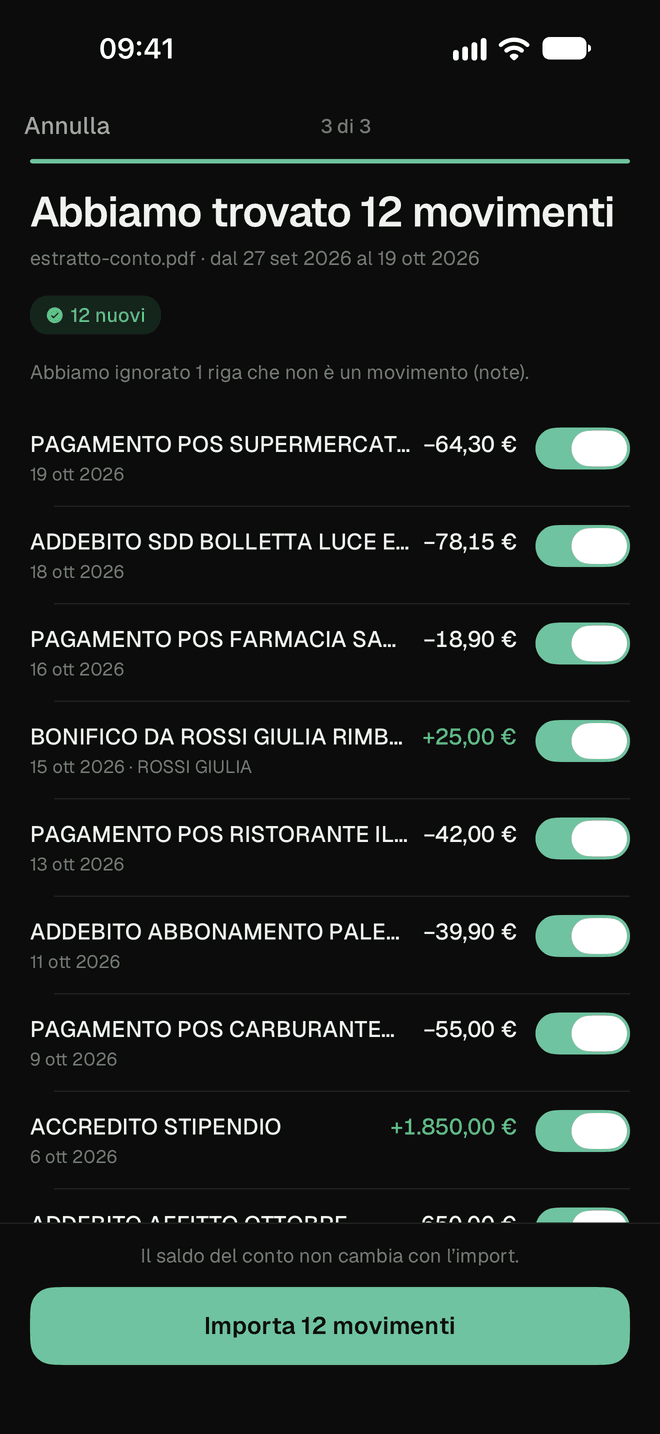
Your bank doesn’t link? Upload your statement as a PDF, CSV or Excel file: it is read automatically. You check the transactions found and confirm them before they are saved.
Alerts when it matters
You don’t need to open the app to know what’s happening. You choose which alerts you get and whether amounts are shown.
- Salary received
- When your salary reaches your account.
- Subscriptions and recurring payments
- The day before the charge and when the price goes up.
- Large expense and low balance
- Above or below the limits you choose.
- Weekly summary
- On Sundays: the week’s income and spending.
And the details that make the difference
- AI summaryWith Premium
- A simple reading of your numbers: how your spending splits, how your net worth is doing, how diversified it is. It describes your situation; it doesn’t tell you what to do.
- Find any transaction
- Search your whole history by name, amount or note. Leave a refund or an expense paid for someone else out of your statistics, and the reason stays visible.
- Where you spent, on a map
- Spending with a location shows up on a map: see in which cities and shops you spend the most.
- Your data, whenever you want
- Export your accounts, transactions and investments to a file whenever you like. If you close your account, everything is deleted.
Close
AI summary
Spending over the last 3 months, net worth and investments today.
Spending
Over the last 3 months you spent €1,452 a month on average. Home and bills is the largest category, at 48% of the total, followed by Groceries at 22%.
Net worth
Your net worth is €56,174, 16.9% more than six months ago. Cash makes up about 60% of the total.
Investments
Your investments are worth €22,264: bonds 50%, shares 37%, crypto 13%.
Automatic analysis of your data, for information only.
Ready in three steps
Download the app
Sign in with your email or with your Apple or Google account. It’s free, and you don’t need a subscription to start.
Add your accounts
Link your bank with read-only access, import your bank statement or enter your balances by hand. Check whether your bank links.
See the full picture
Net worth, spending by category and investments update on one screen. You check and correct; Soldoni does the rest.
Your data stays yours
Soldoni shows you the numbers; it doesn’t touch them. Here is what happens to your data.
Read the privacy policy- Read-only
- Soldoni can read balances and transactions, but cannot move money or make payments. The link goes through a provider authorised under the European PSD2 rules, and you can revoke it whenever you want.
- Data in the European Union
- The app’s servers are in Frankfurt, Germany. Your IBAN is not stored in plain text: we only keep a cryptographic fingerprint that is used to recognise the account.
- No selling of data
- We don’t sell your data and we don’t use it for advertising. There are no third-party tracking tools in the app.
- Face ID
- You can lock the app with Face ID and hide amounts with one tap when you’re in public.
Free to start, Premium when you need it
Free
€0
Net worth, manual accounts, transactions and investments, with no time limit.
Premium
€5.99 a month
Or €59.99 a year, which is €5.00 a month. Free trial: 14 days with the yearly plan, 7 with the monthly one.
Download for free and start your Premium trial from the app.
| Feature | Free | Premium |
|---|---|---|
| Net worth and chart over time | ||
| Manual accounts and cash | ||
| Transactions, categories and search | ||
| Spending analysis and alerts | ||
| Investments with prices updated every day | ||
| Import of orders from your broker’s file | ||
| Linked accounts, updated automatically | ||
| Bank statement import | ||
| Payments recorded from notifications and Apple Pay (iPhone) | ||
| AI summary |
Prices for Italy, VAT included: the final price is the one shown in the App Store. The subscription renews automatically unless you cancel it at least 24 hours before the end of the period. You manage or cancel it in your Apple ID settings.
Frequently asked questions
Can’t find the answer? Write to stefanozarro@gmail.com.
Can Soldoni move my money?
No. Soldoni has read-only access: it sees balances and transactions, but cannot make payments, transfers or any other operations on your accounts.
How does account linking work?
It goes through a provider authorised under the European payments rules (PSD2). You give your consent directly to your bank, on its website or in its app, and you can unlink it from Soldoni whenever you want. Automatic linking is included in Premium.
Is my bank supported?
Check the Supported banks page: it lists the Italian banks that link automatically with Premium. If yours doesn’t link, you can still keep it up to date in three ways: on iPhone we record payments automatically from your bank’s notifications and from Apple Pay; you import your bank statement now and then, for example once a month, to fill in and align your transactions; or you update your transactions by hand, for free. The first two are included in Premium.
Do I have to link my accounts?
No. You can add manual accounts and update the balance by hand or, with Premium, import your bank statement from a file. Investments are entered by hand or from your broker’s file.
What happens to the files I import?
The file is read automatically, also with artificial intelligence if you have agreed to the AI features. We show you the transactions found and you save them only after checking them. If you confirm, we keep the file, encrypted, until you delete it from the app.
Does the AI summary tell me what to do with my money?
No. It describes your spending, net worth and investments based on your data, for information only. It contains no recommendations.
How much is Premium and how do I cancel it?
€5.99 a month or €59.99 a year, with a 14-day free trial on the yearly plan and 7 days on the monthly one. You can cancel whenever you want in your Apple ID settings, at least 24 hours before renewal.
How do I delete my account?
In the app: Settings, then Delete account. Accounts, transactions, investments and imported files are permanently deleted. If you have Premium, also cancel the subscription in your Apple ID settings.

See your whole net worth on one screen.
Free to start. Premium with up to 14 days’ free trial; cancel whenever you want.